
[2023/01/13 再更新]
從 Device Manager 確認 Device 的設定
我們知道從 Device Manager (DevMgmt.msc) 可以確認各個 Device 的狀態與設定等資訊,有些設定可以給使用者決定開或關,那它們都儲存在哪裡呢?
例如:使用者可勾選
“Allow the computer to turn off this device to save power"

有些是存在 Windows Registry 中,那要如何去確認 Registry 的位置呢?
1. 開啟 Device Manager 裡點選你要確認的裝置,按右鍵看內容 Properties。
這裡以在 Windows 10 下檢視
Intel USB 3.1 eXtensible Host Controller 為例。
2. 切換到 Details 那頁,找出 Driver key,按右鍵做 Copy 。
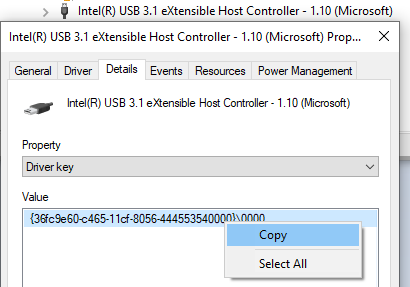
3. 叫出 regedit,從 HKEY_LOCAL_MACHINE\SYSTEM\ 進行搜尋剛剛複製的 Driver key。
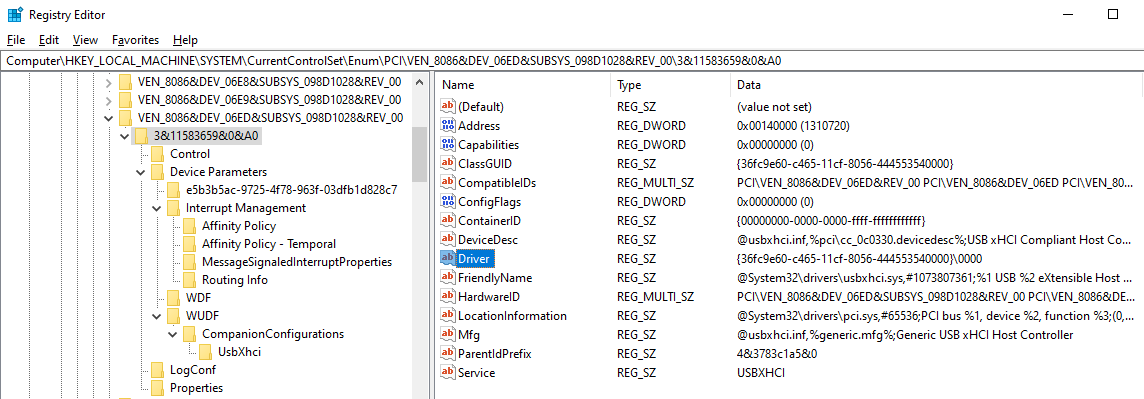
可以看到 [HKEY_LOCAL_MACHINE\SYSTEM\CurrentControlSet\Enum\PCI\VEN_8086&DEV_06ED&SUBSYS_098D1028&REV_00\3&11583659&0&A0] 裡的 Driver 是符合的,那麼這組就是我們的目標。
4. 接下來可以檢視裡面的項目,可以推測
[HKEY_LOCAL_MACHINE\SYSTEM\ControlSet001\Enum\PCI\VEN_8086&DEV_06ED&SUBSYS_098D1028&REV_00\3&11583659&0&A0\Device Parameters\WDF]
“IdleInWorkingState“=dword:00000001
對應到
“Allow the computer to turn off this device to save power"
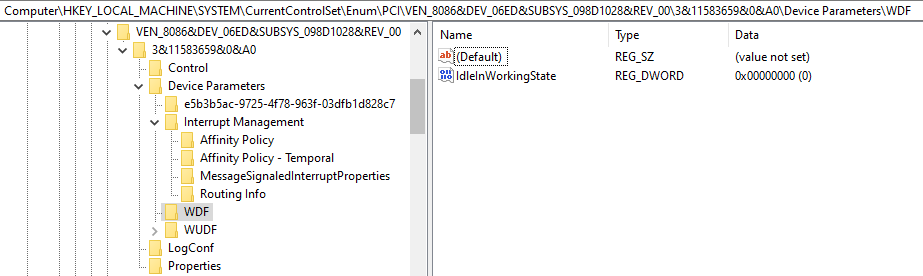
IdleInWorkingState 這個鍵值可儲存該設定。
1 為勾選,0 為取消。
使用者看到的 Power Management 三個開關
從 Device Management 找到 Device 後點出 Property,找出 Power Management 的頁面,可以看到三個開關:
□ Allow the computer to turn off this device to save power
□ Allow this device to wake the computer
□ Only allow a magic packet to wake the computer
Network Adapter 的秘密在 “PnPCapabilities"
此篇 [January 15] Allow the computer to turn off this device to save power is grayed out
提到"Allow the computer to turn off this device to save power" 是由 DWORD registry “PnPCapabilities" 來控制:
當值為24時,該選項會灰底。
當值為0,表示允許在Idle時關閉裝置。
但僅在 Network Device 找到,推測:
“PnPCapabilities" 似乎僅為 Network Device 所用?
微軟怎麼說…
裡面詳述關於 networking 有三種選項:
□ Allow the computer to turn off this device to save power
□ Allow this device to wake the computer
□ Only allow a magic packet to wake the computer

對照 [HKEY_LOCAL_MACHINE\SYSTEM\CurrentControlSet\Control\Class\{4d36e972-e325-11ce-bfc1-08002be10318}\0010]
(注意:0010為Device Number,各機台不同)
當三個選項勾選狀況為以下:
- VVX – PnPCapabilities = 0 (預設)
- VVV – PnPCapabilities = 0x100 (256)
- VXX – PnPCapabilities = 0x110 (272)
- X– – PnPCapabilities = 0x118 (280)
微軟文件也指出,有些操作會導致矛盾的值產生,例:
- 先開三個勾勾 VVV – PnPCapabilities = 0x100 (256)
- 取消第一個勾勾 Xvv – PnPCapabilities = 0x118 (280)
- 再勾第一及第二,第三不勾 VVx – PnPCapabilities = 0
- 再重覆第二步(取消第一個勾勾) Xvx – PnPCapabilities = 0x18 (24)
這樣的操作後竟然和前面說明的不同結果??其中邏輯真的是讓人一頭霧水…
實際還是得依歸微軟黑盒子的內部邏輯…。
 薪柴之間
薪柴之間 